As a digital artist and designer with over ten years of experience with images and videos, I routinely work with most file formats. However, a failure in a file format can completely disrupt post-production.
When advising other artists in 3D rendering, VFX, or color grading, selecting the correct file format is more than just a technical choice—it’s essential for preserving data integrity. For final delivery, multi-pass 3D rendering, and complex VFX compositing, I consistently prefer OpenEXR (EXR).
Let me break down why EXR is the definitive standard in 2026, in detail how it compares to legacy formats like PNG and JPG, outline critical technical nuances, and project where the industry is heading over the next decade.
As shown in the image below, most studios and artists use this workflow to maintain data integrity and prevent data loss throughout the production pipeline.
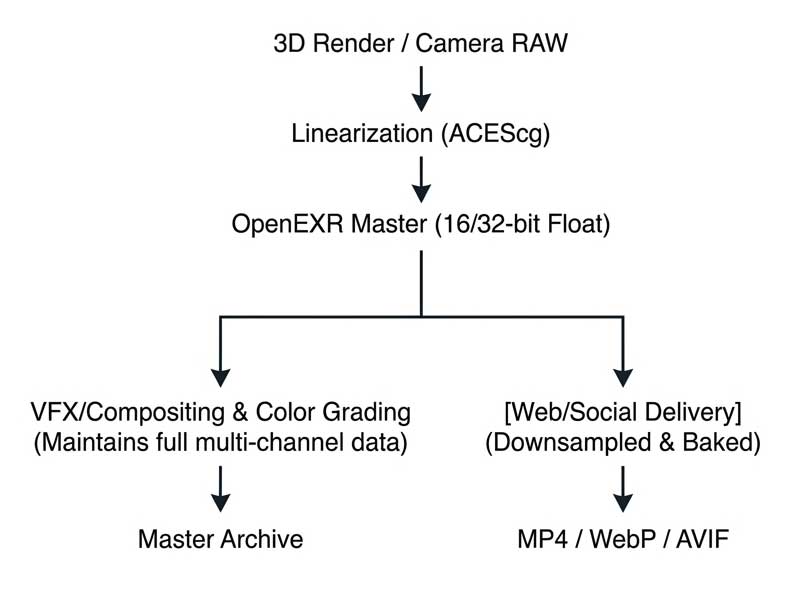
To understand why OpenEXR is preferred, we must first establish what these formats are and where they stand in today’s media landscape.
Bit Depth and Value Resolution
- 8-bit Integer (JPG): Offers exactly 256 steps of color per channel. Values are locked between 0 (black) and 255 (white).
- 16-bit Integer (PNG): Offers 65,536 steps of color. While cleaner, values are still bounded between 0 and 1.
- 16-bit “Half” Float (EXR): Offers 1,024 steps of precision per f-stop across a dynamic range spanning over 30 f-stops (OpenEXR Technical Specs). It uses 1 bit for the sign, 5 bits for the exponent, and 10 bits for the mantissa.
- 32-bit “Full” Float (EXR): Provides near-infinite precision, used primarily for scientific data passes, coordinate mapping (P-World), and complex simulation vectors.
Here is a short comparison table you to understand.
| Attribute | OpenEXR (.exr) | Portable Network Graphics (.png) | Joint Photographic Experts Group (.jpg / .jpeg) |
| Color Space Default | Linear Scene-Referred | Display-Referred (sRGB / Gamma) | Display-Referred (sRGB / Gamma) |
| Data Representation | 16-bit Half Float, 32-bit Float, 32-bit Integer | 8-bit or 16-bit Integer | 8-bit, integer-based |
| Dynamic Range | Ultra-High ($>30$ f-stops of light data) | Standard/Low (LDR) | Low (SDR) |
| Compression Type | Advanced modern (e.g., HTJ2K, deep data, multipart) | Lossless | Lossy (destructive compression artifacts) |
| Alpha Channel Support | Advanced (Straight or Premultiplied) | Basic (Straight Alpha Only) | None |
| Current Governance / Status (2026) | Governed by Academy Software Foundation (ASWF); v3.2+ | Institutional utility format | Dominant format for web and previews |
| Primary Use Cases (2026) | VFX, CGI, linear scene data, multi-channel packing | Web, User Interfaces (UI), basic 2D graphic assets | Digital photography previews, web consumerism |
| Pipeline Suitability | Mandated baseline by the VFX Reference Platform (CY2026) | Unequipped for modern film; cannot store linear/floating-point data | Analytical hazard in professional CGI/VFX due to quality loss |
Core Architectural Themes & Drivers
Four major technical drivers dictate why EXR dominates the pipeline.
Theme 1: Scene-Linear Color & ACES Integration
OpenEXR natively stores images in Scene-Linear color space, meaning the digital values in the file are directly proportional to the amount of light in the physical (or simulated) scene.
Legacy formats like PNG and JPG require non-linear gamma baking (e.g., Gamma 2.2 or sRGB curves) to maximize limited 8-bit buckets. When compositing or color grading in standard software, light must behave predictably.
If you add two linear values ($0.5 + 0.5$), it equals $1.0$ (double the physical light). If you attempt this math on gamma-baked PNG or JPG profiles, the calculations break down, resulting in unnatural color fringing and physically incorrect light wraps. This is why EXR serves as the native delivery backbone for the Academy Color Encoding System (ACES) pipeline.
Theme 2: Channel Packing and Cryptomatte Execution
In multi-pass 3D rendering (from engines like Cycles, Karma, Arnold, or V-Ray), an image is not just a flat picture. It is a collection of data layers: Diffuse, Specular, Refraction, Z-Depth, Motion Vectors, and Surface Normals.
MASTER.EXR
| RGB (Beauty) | Alpha (Cutout) | Z-Depth (Depth-Map) | Cryptomatte (ID Masks) |
OpenEXR allows a technical artist to compress all of these arbitrary layers into a single, structured file. Furthermore, it supports Cryptomatte—an ID-generation system that packs organizational data directly into the EXR channels, allowing compositors to instantly isolate any individual object or material in a shot without requiring manual rotoscoping.
Theme 3: Deep Data Composition
One of the most revolutionary features of OpenEXR is its support for Deep Data. In a standard flat image, a pixel holds a single color value and a single depth value. If a pixel contains both a volumetric cloud and a hard surface behind it, a flat format forces a choice or an un-antialiased blend.
Deep EXR files store a variable-length list of samples at multiple depths per pixel. This allows VFX compositors to place 3D elements inside complex FX simulations (such as Houdini smoke, dust, or fire) with perfect volumetric occlusion and edge transparency, eliminating the need for complex holdout mattes.
Theme 4: High-Performance Advanced Compression
While uncompressed EXR sequences are massive, the format features advanced internal codecs. As of 2026, the industry heavily relies on DWAA and DWAB compression schemes—lossy, block-based discrete cosine transform (DCT) methods that behave similarly to JPEG but are tuned for multi-channel floating-point data.
DWAA/B can reduce file sizes by up to 70-85% while remaining completely visually lossless, drastically lowering network bandwidth strains on shared studio storage servers without compromising the final grade.
4. Disadvantages, Controversies, and Risks
Despite its dominance, OpenEXR is not without significant friction points and valid institutional pushback.
- Storage and Bandwidth Strains: Uncompressed 4K 32-bit float multi-layer EXR frames can easily exceed 100MB per frame. At 24 frames per second, a single minute of footage requires roughly 144GB of storage. This puts enormous pressure on local storage arrays, demanding expensive high-throughput NVMe RAID architectures or fast network infrastructure to playback sequences seamlessly without caching lag.
- The Playback CPU/GPU Overhead: Image sequences require software to open and close thousands of individual files sequentially. For editors working on a narrative cut, playing back an EXR sequence introduces immense storage overhead. This creates a functional rift in pipelines: editors universally prefer unified container formats like Apple ProRes 422 HQ or DNxHR (.mov/.mxf), while VFX departments demand EXR image sequences.
- The “Double Premultiplication” Math Hazard: EXR defaults to premultiplied alpha channels ($Color \times Alpha$). If an inexperienced artist imports a premultiplied EXR into a video editor or compositing program and inadvertently applies a second alpha multiplication pass, the math breaks down. This error produces an ugly, distinct dark fringe or white artifact ring around the edges of transparent objects.
5. Future Outlook & Next-Decade Predictions (2026–2036)
As we project the trajectory of digital media over the next decade, the role of OpenEXR will evolve alongside structural changes in machine learning and hardware performance.
Prediction 1: The Integration of Real-Time Engine Pipelines (USD + EXR)
With Unreal Engine 5/6 and alternative real-time simulation platforms handling final pixels directly on virtual production led volumes, the boundary between “offline rendering” and “live capture” is fading.
Over the next decade, the industry will pivot toward tighter unification between Universal Scene Description (OpenUSD) and OpenEXR metadata. Expect EXR metadata headers to dynamically carry live camera tracking positions, lens distortion maps, and virtual lighting matrices directly from the stage straight into Nuke or DaVinci Resolve.
Prediction 2: High-Throughput JPEG-2000 (HTJ2K) Standardization
As ratified in recent OpenEXR updates, the inclusion of HTJ2K compression will gradually replace traditional ZIP and PIZ formats for lossless workflows (OpenEXR 3.x Release Framework). Offering massive parallel processing speed improvements via GPU hardware acceleration, HTJ2K will allow next-generation workstations to decompress and playback lossless 4K and 8K EXR master sequences in real-time without requiring low-resolution proxy pre-renders.
Prediction 3: AI-Driven Multi-Channel Compression
By 2030, neural network-based compression models will likely be built into the OpenEXR core standard. These models will read highly complex utility channels (like depth maps and motion vectors) and compress them using spatial AI patterns. This advance will drastically reduce multi-layer storage overhead by up to 50% while completely preserving the analytical accuracy required by compositing algorithms.
6. The Definitive Hand-Off Cheat Sheet
For your blog readers, use this simple rubric to help them determine exactly when to utilize these formats:
- Render Phase (Blender / Houdini / Maya): Set output format to OpenEXR (16-bit Half-Float). Use DWAA compression for beauty passes to save storage space, and ZIP/PIZ for utility channels like Z-Depth or Motion Vectors to ensure mathematical precision.
- Compositing and Grading Phase (Nuke / Fusion / Resolve): Keep the pipeline completely linear using the EXR sequence. Do not convert to video formats until the project is locked and ready for mastering.
- Web, Social Media, and Upload Delivery (YouTube / Instagram): Do not upload image sequences. Export a unified MP4 container using the H.264 or H.265 (HEVC) codec. To maximize quality against social media compression algorithms, upscale 1080p timelines to 4K MP4 before uploading; this forces platforms like YouTube to assign a higher-quality playback codec (VP9/AV1) to your video.

Leave a Reply